

How to Turn Your Shopify Plus Store Into a Mobile App

How to Turn Your Shopify Plus Store Into a Mobile App
If you’re running a Shopify Plus brand, you should probably have a mobile app.
It’s at this scale that a mobile app becomes a crucial brand asset; which, if you build it the right way, is hard not to see a positive return from.
But the irony is that it’s harder for Shopify Plus brands to launch an app, compared to standard Shopify stores. Because the custom nature of brands using Shopify Plus clashes with the template-based nature of most Shopify mobile app builders.
There is a pathway, though, to getting a full-featured mobile app that holds on to all the custom, unique touches that make your Shopify Plus store great. You just need to get clear on the goal – what your app really needs to do – and pick one of two ways to get there.
Why Your Shopify Plus Store Needs a Mobile App
Most Shopify Plus brands should have a mobile app.
At this scale, you don’t need every customer to download it for the investment to make sense. You don’t even need a quarter of your regular customers to download it.
Apps are a channel for your most loyal, highest-intent customers. When they start shopping in your app, data shows they come back more often, spend longer in each session, and spend more money over time.
The larger your customer base, the lower your adoption needs to be for that small share of your customers to add up to a sizable revenue channel.
It’s not about replacing your website. Your site is where people go to discover you, to buy for the first time, and for many, where they’d prefer to shop.
But for that top segment of your customers, they get a faster, more direct route back to your store.
It also gives you benefits that your website can’t provide on its own:
- Your brand has a permanent place on the customer’s home screen.
- Customers can open your store directly instead of finding their way back through a browser.
- Push notifications let you reach app users with product launches, restocks, promotions, and cart reminders.
- Deep links can take customers from a notification directly to a product, collection, or checkout rather than dropping them on your homepage.
- Native navigation and app-specific menus make it easier for regular customers to get where they want to go.
Realistically, unless your business is just not at all suited for an app, this channel is one that any serious brand should have.
What Does “Turning a Shopify Plus Store Into an App” Mean?
The goal of an app, and of “turning” your store into an app is to extend it to a new channel, a channel that’s uniquely your brand.
Your site is probably a strong channel already. It’s the product of years of work, hundreds of thousands of dollars invested. Features, design, integrations, everything plays a pivotal part in your brand image, and in converting browsers into buyers.
But it’s not an app. It can’t run on your customer’s device, it can’t get published in the App Store, it can’t send native push notifications.
It can’t quite deliver the user experience an app can.
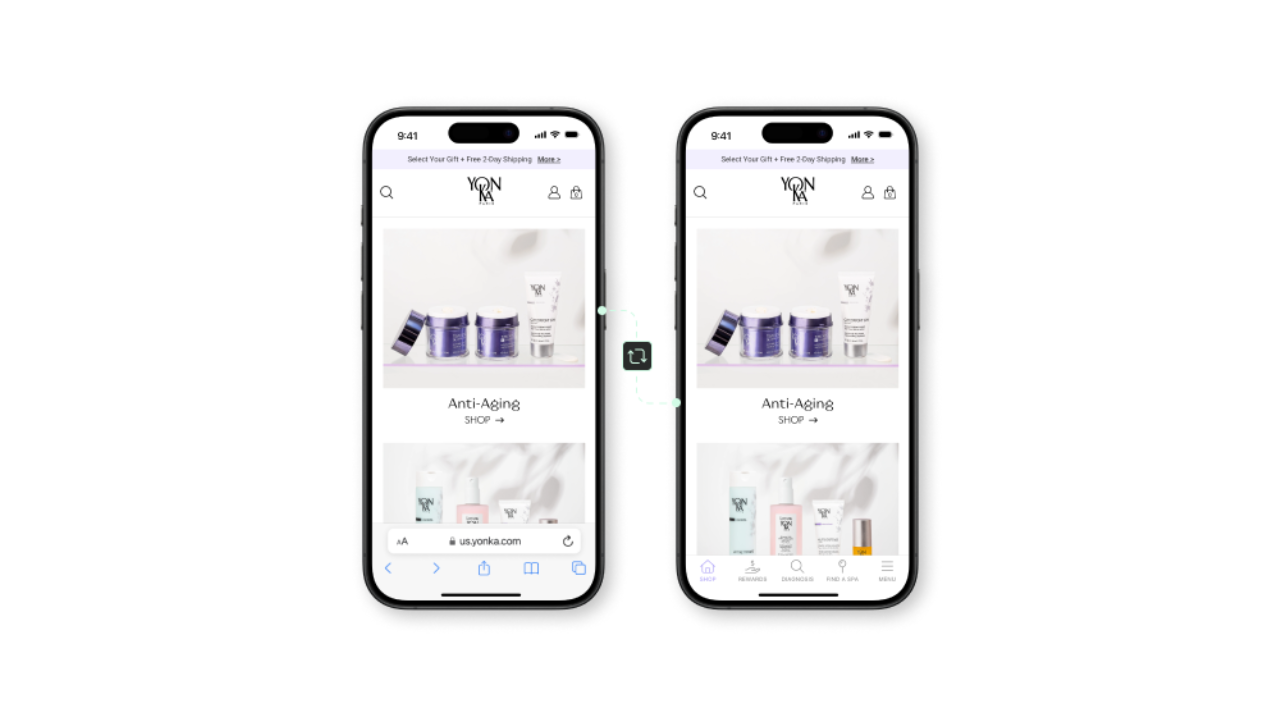
Your goal is to turn your existing web experience, and all the capital you’ve invested in it, into an app that lives on your customer’s phone.
You want to combine the best parts of your web experience with the best parts of an app.
That means keeping things like:
- Your branding, visual design, and responsive UI
- Apps and integrations (subscription apps, loyalty, search and filtering)
- Product page design, variants, other merchandising features
- Any custom features developed for your store
And adding the parts that make your app feel like an app:
- Native push notifications
- Tab menu navigation and native UI tweaks
- New pages and experiences built for app users
- Distribution through the Apple App Store and Google Play Store
With the right approach, customers get a consistent experience across both surfaces, while your team can continue operating them as parts of the same store.
Why It’s Harder to Build an App for a Shopify Plus Store
If you’re on Shopify Plus, you almost certainly have a level of customization and complexity that’s beyond the standard Shopify store.
With a typical store, launching an app is easy. There are dozens of no-code app builders that can spin up a basic app that looks more or less like your brand.
But the more custom your store, the harder it is to replicate it as an app.
Generic tools aren’t built for unique, powerful websites. So when you look at the most widely used app solutions, their output means sacrificing a lot of what makes your website great. It’s a step back, when an app should be a step forward, a better user experience for your best customers.
It’s not inherently harder to launch an app, full stop. It’s harder to launch an app that has parity with your site.
And that’s what your most basic requirement should be when launching an app. The app doesn’t have to be significantly better than your site. But it can’t be worse than your site. If it is, there’s not much reason for a customer to use your app, when they can get a fuller experience from your website.
Two Ways to Turn a Shopify Plus Store Into a Mobile App
For Shopify Plus stores, where maintaining parity with a custom, complex web setup is a priority, there are two realistic routes you can go to launch a mobile app.
1: Build a Custom App on Shopify’s APIs
The first option is to build a custom app for your store, and achieve parity this way.
Everything you build, you build it from the ground up, to fit your brand and your requirements.
Shopify has a decent API infrastructure you can use to build an app and connect it with your site, so product details and orders and all the core commerce operations are synced across both channels.
This can mean essentially going headless, developing a custom frontend for your app that connects with your store on the backend. It can also mean using one of those mass-market app builders, with custom development on top to bridge the gap between the platform’s capabilities and what you want from your mobile app.
Either way, this option takes a lot more work, a lot more investment, and is more difficult to manage, because you’re running two separate channels in parallel.
2: Build an App as an Extension of Your Site
The second option is to build an app on top of your existing site; using your site as the foundation for the app, with a native layer on top.
Most app builders don’t do this. They build an app alongside your site, which is a replication of your site. And the more complex your site is, the more the two experiences differ.
MobiLoud is one of the few Shopify mobile app builders that directly converts your store into an app.
It pulls all the design, functionality, integrations and backend logic from your site into the app, and adds a native layer that turns it into a real app: native navigation, push notifications, deep linking, social login and all the other small but meaningful features of a true mobile app.
The two channels are fully synchronized, because all the core experience comes directly from your site. It’s not rebuilt in a separate platform. You have one codebase to maintain, publishing to two surfaces: website and app.
This approach can be a little more work if you want to build an app that offers a completely differentiated experience from your website; if your goal is to launch essentially a different storefront.
But if your goal is consistency, and carrying everything that makes your Shopify Plus store great into a native app, it’s easily the most efficient and effective way to get there.
What’s the Best Way to Turn Your Shopify Plus Store into an App
There are many ways to do anything; including launching a mobile app.
The two above are the best options you have for creating an app that measures up to your Shopify Plus-powered website. You can go custom, building each screen and interaction essentially from scratch. Or you can use MobiLoud’s website-to-app approach, building on top of your existing site, to guarantee full feature parity between your website and your mobile app.
The first gives you more freedom to build an app that diverges from what you’ve built on the web, but for a significantly higher cost in upfront development costs, time, and long-term maintenance.
With the second option, your app and website are more closely linked. Yet you can still create a unique experience in your app, and since you’re reusing what you’ve already built, it’s much quicker, more cost-effective, and easier to stay consistent with your website.
Here’s a breakdown on how the two approaches stack up:
| Consideration | Custom Development | Website-to-App |
| Starting point | A new mobile frontend | Your existing Shopify Plus storefront |
| Existing design and functionality | Rebuilt for the app | Used directly in the app |
| Design freedom | Complete control | Built around your current mobile experience |
| Integrations | Connected or rebuilt individually | Existing website integrations remain in place |
| Website updates | Must also be implemented in the app | Flow through from the website |
| Ongoing management | Separate mobile codebase and development process | Website remains the main source of truth |
| Best suited to | A distinct app with its own experience and roadmap | Extending an established store into a native app |
Neither is wrong; it’s just about how you want to approach your app, and what you want it to be.
Give Your Shopify Plus Store the App It Deserves
If you’re doing the kind of business that a Shopify Plus store does, it makes little sense not to have a mobile app.
The app could be a million-dollar revenue channel, even if it only serves a small share of your overall customer base.
The only question is how you’re going to build it.
Whichever route you go down, keep the end goal in mind: a channel that’s a natural extension of your website, keeping all the best parts of what you’ve already built for the web, and delivering it in a package that keeps your brand experience consistent across each channel you appear.
Do that, and turning your Shopify Plus store into an app could be the best project you move forward with this year.
Was this news helpful?
 Yes, great stuff!
 I’m not sure
 No, doesn’t relate