



How to optimize your PDP for SEO?


How to optimize your PDP for SEO?
Your Product Detail Page (PDP) is the single most decisive page in your eCommerce funnel. It’s where browsing turns into buying. In 2026, with AI-driven search engines, mobile-first indexing, and zero-click SERPs reshaping how users discover products, every element on your PDP either earns you visibility or costs you revenue.
Research consistently shows that 87% of online shoppers consider product content the top factor in their purchase decision. That stat alone should make PDP optimization your highest priority.
This article breaks down 12 actionable tips to optimize your PDP for SEO and conversion simultaneously. Each tip targets a specific element, from breadcrumbs to social tags, so you can turn product pages into ranking, revenue-generating assets.
1. Use breadcrumb navigation with links to the category
Breadcrumbs give users and search engines a clear hierarchical path through your site: Home > Category > Subcategory > Product. This simple trail does heavy lifting for crawlability and link equity distribution.
Make every breadcrumb segment a clickable link pointing back to its parent category page. Quoting Lucio Laria, Head of SEO at Onze SEO Agency : ”Proper breadcrumb linking improves both crawl efficiency and internal PageRank flow across category structures”.
Add BreadcrumbList schema markup to unlock breadcrumb rich results in Google SERPs. Users who see that clean path in search results click more confidently. And on-site, breadcrumbs reduce bounce rate by letting visitors navigate back without hitting the browser’s back button.
2. Craft an H1 title optimized for your target query
Your H1 must contain the primary keyword, clearly describe the product, and remain unique across every PDP on your site. Duplicate H1s confuse search engines and dilute ranking potential.
Follow a naming convention that prioritizes high-converting attributes. A proven formula looks like this: [Color] [Material] [Product Name] [Product Type]. So instead of “Luna,” write “Green Indoor Fern Plant — Luna.” You capture both the branded name and the search-friendly descriptor.
Documented case studies show that refining product naming conventions can boost SEO impressions and clicks by up to 80%. That’s not a marginal gain. Balance brand identity with what real people actually type into Google.
3. Optimize images for both SEO and conversion
Rename every image file with descriptive, keyword-rich names before uploading. “black-leather-slim-wallet-front.webp” beats “IMG_001.jpg” every time. Search engines read file names, and so do screen readers.
Write unique alt text for each image. Describe what the photo shows and weave in relevant keywords naturally, without stuffing. Serve images in next-gen formats like WebP or AVIF, and activate lazy loading to keep Core Web Vitals healthy.
Include multiple high-quality shots: front, back, detail zoom, lifestyle context. Images are the #1 substitute for physical touch in eCommerce, and they directly influence whether someone clicks “Add to Cart.”
4. Write detailed and well-structured descriptive content
Stop copying manufacturer descriptions. Duplicate content kills your rankings and makes your page invisible next to competitors selling the same product. Write original, benefit-driven copy that speaks to your specific audience.
Structure matters as much as substance:
- Short paragraphs (2–3 sentences max)
- Bullet points for specs and features
- Subheadings that guide scanners
Weave primary and secondary keywords throughout descriptions, spec lists, and feature highlights. Focus on benefits over features. Don’t just say “waterproof nylon.” Explain that the bag keeps a laptop dry during a downpour. That emotional hook drives both engagement and conversions.

5. Place a clear and visible call to action above the fold
Your “Add to Cart” or “Buy Now” button must sit above the fold, visually distinct, and impossible to miss. Surround it with essential purchase details: price, stock availability, shipping estimate, and sizing options.
Test CTA placement on smaller laptop screens and mobile devices. What looks above the fold on a 27-inch monitor often drops below it on a 13-inch screen. Don’t assume, verify.
Strong CTAs improve conversion rates and user engagement signals like dwell time. Those behavioral metrics send positive ranking signals to search engines, creating a virtuous cycle between UX and SEO.
6. Highlight and manage customer reviews effectively
Display star ratings and total review count near the product title above the fold. Shoppers look for social proof within seconds of landing on a PDP.
Implement AggregateRating schema markup to earn rich snippets with stars in SERPs. Those golden stars dramatically lift click-through rates. Beyond schema, user-generated reviews naturally inject long-tail keywords and fresh content onto your page, giving search engines new material to index.
Moderate reviews actively. Respond to negative feedback professionally, and send post-purchase emails encouraging honest reviews. A healthy review ecosystem builds trust with both customers and algorithms.
7. Strengthen internal linking to related products and content
Cross-sell and upsell sections (“You might also like,” “Frequently bought together”) distribute link equity across your catalog while increasing average order value. Two wins from one element.
Link from your PDP to relevant blog posts, buying guides, or parent category pages. This creates topical clusters that reinforce your authority on a subject. Use descriptive anchor text, never generic “click here” links, so search engines understand the relationship between pages.
Position these links strategically. Place them after the main product content, not before the user has evaluated what they came for. Premature linking distracts and leaks attention.
8. Implement structured product data (schema markup)
Add Product schema with these essential properties: name, brand, image, description, SKU, price, currency, availability, and review ratings. This structured data unlocks rich results in Google showing price, stock status, and star ratings directly in SERPs.
Use JSON-LD format, Google’s recommended approach. Validate every implementation with Google’s Rich Results Test and Schema Markup Validator before deploying to production.
Keep schema data perfectly synchronized with your on-page content and inventory system. Mismatches between displayed prices and schema prices can trigger manual action penalties for misleading structured data. Automation helps here, connect your schema output directly to your product database.
9. Add an SEO-optimized FAQ section to your PDP
Include 3 to 5 questions specific to the product: materials, care instructions, sizing, compatibility, return policy. Implement FAQPage schema markup alongside each Q&A block to potentially earn expanded SERP real estate.
FAQs add keyword-rich content to otherwise thin product pages without cluttering the above-the-fold experience. Tuck them below the main description and reviews.
Source your questions from real data:
- Customer support tickets and live chat logs
- “People Also Ask” boxes for related queries
- On-site search queries that lead to the product
Real questions produce relevant answers. Invented FAQs feel hollow and miss actual search intent.
10. Design a clean and sustainable URL structure
Short, readable, keyword-rich URLs outperform parameter-heavy dynamic strings. Aim for a pattern like `/category/product-name/` and avoid session IDs, tracking parameters, or filter strings in canonical URLs.
Including the product category in the URL path reinforces topical hierarchy for search engines. `/shoes/black-leather-oxford/` tells Google more than `/p/12847/`.
Never change URLs casually when updating product details. If a URL change becomes unavoidable, implement a proper 301 redirect immediately to preserve accumulated link equity. Every broken URL leaks ranking power you spent months building.
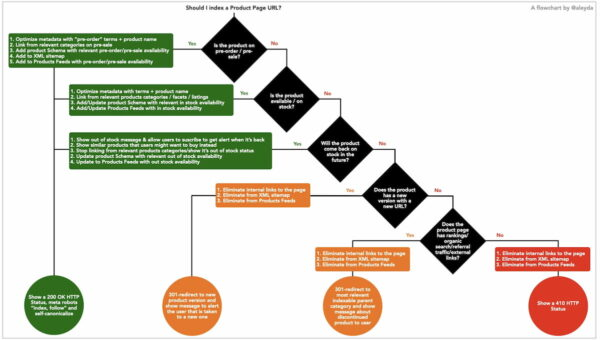
11. Handle out-of-stock products without losing SEO value
Never delete or 404 a product page that holds backlinks, rankings, or consistent traffic. That SEO equity vanishes the moment the page returns a 404 status code.
Keep the page live instead. Display a clear “Out of Stock” label, suggest similar available products through internal links, and offer a back-in-stock email notification. Update the Product schema availability property to “OutOfStock” so Google reflects accurate information.
For permanently discontinued items, 301 redirect the URL to the closest equivalent product or the parent category page. This preserves link value and guides users toward a relevant alternative rather than a dead end.
12. Optimize your PDP for social sharing with OpenGraph and Twitter Cards
Implement OpenGraph tags (og:title, og:description, og:image, og:price:amount) so your PDP renders attractively when someone shares it on Facebook, LinkedIn, or messaging apps. Without these tags, platforms pull random content and thumbnail images that rarely look appealing.
Add Twitter Card meta tags (twitter:card, twitter:title, twitter:image) to control how your product appears on X/Twitter. Use summary_large_image card type for maximum visual impact.
Your social preview image should measure at least 1200×630px, look sharp, and showcase the product clearly. Social sharing amplifies brand visibility, drives referral traffic, and occasionally sparks link-building opportunities that feed back into your organic rankings.
Was this news helpful?
 Yes, great stuff!
 I’m not sure
 No, doesn’t relate



